Almost all tables and views available in MyCourts, including
graphs, can be printed or saved in almost every common format including PDF,
HTML, MHT, RTF, Excel, CSV, TEXT or as an IMAGE in various formats.
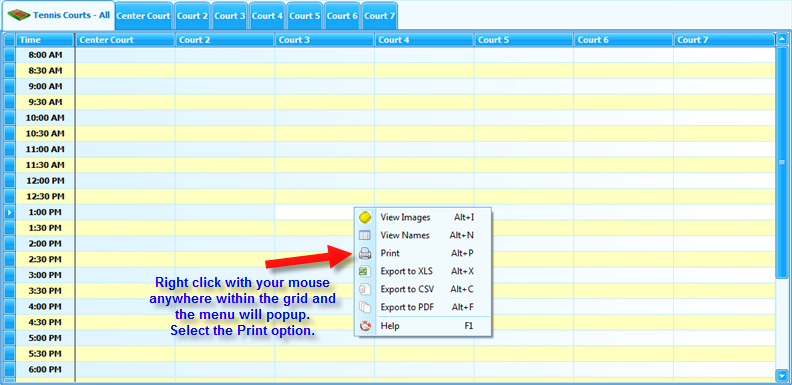
Many views can be 'right clicked' and immediately exported or
viewed, others require you to select the Print icon which will take you to the
Print Preview screen.
The following image shows the popup menu after right clicking in the Tennis Courts Group grid:
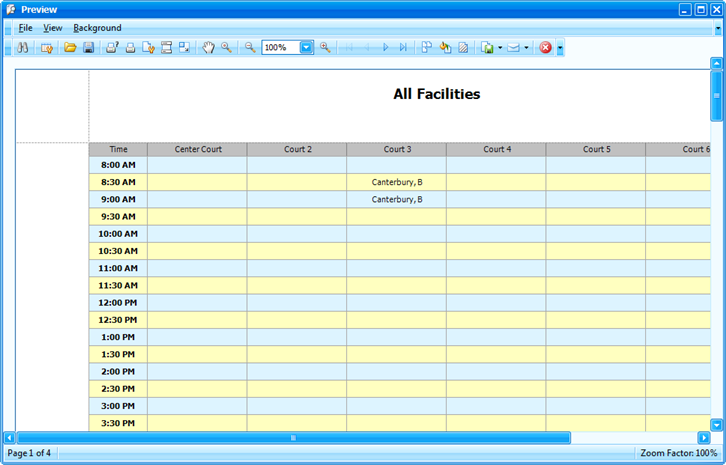
Once you are at the Print Preview screen you can click the
Export (or Save) icon and save/export to the format of your choice.
As in the above example - the Print Preview screen...
Article ID: 16, Created: 1/31/2010 at 11:01 PM, Modified: 5/19/2012 at 10:59 AM